AIBID
AIBID BLOG

AI & Tech

Latest AI products, models, agents, robotics, chips, funding and open source.

Developer Tools · 10 d ago

GitHub Recaps August 17 Outage and Outlines Reliability Efforts

What happened

GitHub published a blog post called 'The August 17 outage, and the work ahead' that provides an update on the service disruption that occurred on August 17.

The post says the company is taking steps to improve reliability in response to the incident.

Why it matters

Many developers and organizations rely on GitHub to host and manage code, so disruptions can have a wide impact on workflows and collaboration.

A public update after an outage is important for transparency and for reassuring users that the platform's stability is being addressed.

Key facts

An outage occurred on August 17.

GitHub issued an update about the outage.

GitHub is taking steps to improve reliability.

What to watch next

Users may watch for more detailed technical reports or follow-up posts about the outage's root cause.

Future announcements could reveal specific reliability measures GitHub plans to implement.

Sources

Read → Keep scrolling for the next story
Developer Tools · 10 d ago

GitHub launches Windows 11 arm64 image with Visual Studio 2026 for hosted runners

What happened

GitHub has announced the general availability of a Windows 11 arm64 runner image that includes Visual Studio 2026.

The image is available on standard and larger GitHub-hosted runners, expanding the architecture options for GitHub Actions users.

Developers who want to use the image need to update their GitHub Actions workflow file, per the announcement.

Why it matters

This release gives Windows developers more flexibility when running CI/CD pipelines on GitHub-hosted infrastructure, particularly for ARM-based workloads.

Adding an arm64 Windows image to the hosted runner lineup broadens the testing and build options available directly through GitHub Actions without requiring self-hosted runners.

Key facts

The Windows 11 arm64 image with Visual Studio 2026 is generally available.

It is offered on standard and larger GitHub-hosted runners.

To use it in GitHub Actions, users must update their workflow file.

What to watch next

Developers should check the GitHub changelog and workflow documentation for the exact syntax needed to switch to the new image.

Expect teams building for ARM64 Windows to begin migrating their pipelines to the new hosted runners and validating their builds.

Sources

Read → Keep scrolling for the next story
Developer Tools · 10 d ago

Cloudflare OAuth adds optional scopes for finer-grained consent

What happened

Cloudflare's OAuth implementation has moved beyond an all-or-nothing approach by adding support for optional scopes.

With this change, users can grant access to only what a specific task requires, rather than approving a broad set of permissions.

Developers can now design consent flows that align with the immediate action the app is performing.

Why it matters

This shift puts more control in users' hands, potentially reducing the friction of approving overly broad access requests.

Task-based consent flows encourage a security mindset where apps request only the minimum permissions needed at each step.

It reflects a broader trend in identity and access management toward more granular, user-centric authorization.

Key facts

Cloudflare OAuth now supports optional scopes.

Users gain more control over what an app can access.

The feature helps developers build secure consent flows around the task at hand.

What to watch next

See how developers adopt optional scopes in real-world OAuth consent screens.

Watch for whether other identity providers follow with similar granular consent options.

Sources

Read → Keep scrolling for the next story
Developer Tools · 10 d ago

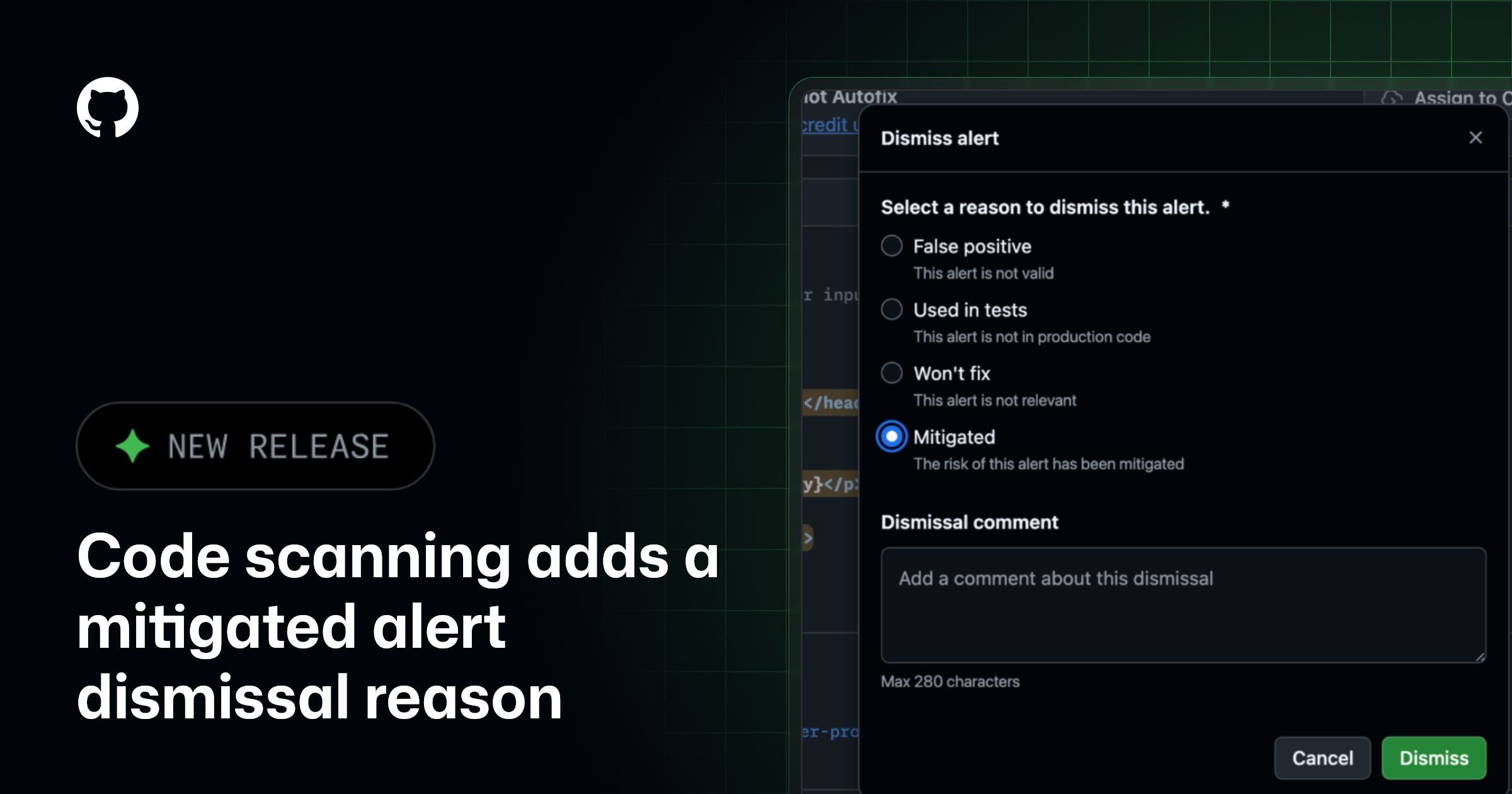
GitHub Code Scanning Adds 'Mitigated' Alert Dismissal Reason

What happened

GitHub has introduced a new dismissal reason for code scanning alerts: Mitigated.

This option lets users dismiss an alert when a vulnerability is still present in the code but external controls, such as a web application firewall or network measures, help address the risk.

Why it matters

Previously, security teams may have lacked a precise way to record that a vulnerability was not being fixed in code but was handled elsewhere.

The new reason makes alert triage more accurate, helping teams distinguish between false positives, accepted risks, and vulnerabilities actively mitigated by outside safeguards.

Key facts

The code scanning feature now includes a 'Mitigated' alert dismissal reason.

This reason applies when a vulnerability remains in the code but external controls, such as a web application firewall or network protections, mitigate it.

What to watch next

Expect more granular alert management options as GitHub continues refining code scanning workflows.

Teams should update their triage processes to incorporate the 'Mitigated' reason where external controls are in place.

Sources

Read → Keep scrolling for the next story
Developer Tools · 10 d ago

GitHub Launches Dedicated Actions Path for Code Quality Workflows

What happened

GitHub has made generally available a dedicated workflow path for code quality CodeQL actions workflows.

As part of this change, workflow run history and Actions usage reports can now distinguish GitHub Code Quality runs from other Actions activity.

Why it matters

This separation gives teams clearer visibility into code quality scanning activity, making it easier to spot CodeQL runs in busy workflow histories.

Distinguishing these runs in usage reports could also help organizations better understand and manage the resources consumed by code quality workflows.

Key facts

A dedicated workflow path for code quality CodeQL actions workflows is now generally available.

Workflow run history and Actions usage reports now differentiate GitHub Code Quality runs.

What to watch next

Organizations using CodeQL can check their next workflow run history and usage reports to see how GitHub Code Quality runs are displayed under the new path.

Sources

Read → Keep scrolling for the next story
罗永浩@luoyonghao · AIBID #1

【严肃提醒】我从未参与、推广或代言任何虚拟货币项目。所有使用我名字、头像或形象的账号均为假冒,请勿相信任何相关投资信息。

♡ 738 💬 690 ↻ 18
Details →
Developer Tools · 10 d ago

GitHub Audit Log Now Tracks Code Quality Setting Changes

What happened

GitHub Code Quality has expanded its audit logging to record every time someone enables, disables, or adjusts its settings on a repository. This means configuration changes are no longer silent.

The history is captured through three new events, including repo.code_quality_enabled, which records when the feature is turned on. The other two events cover the remaining enablement and settings actions.

Why it matters

For organizations that rely on audit logs for security and compliance, this change offers a clearer view of how Code Quality is being configured across repositories. It makes it easier to spot unexpected modifications or verify that changes follow internal policy.

Previously, such configuration activity may have left no trace in the audit trail. Now admins have a documented record of who changed Code Quality settings and when.

Key facts

GitHub Code Quality writes an audit log event whenever someone enables, disables, or changes its settings on a repository.

Three new events provide this history.

One of the new events is repo.code_quality_enabled.

What to watch next

Teams should check whether their audit log monitoring and alerting systems capture these new events, especially if they track configuration changes closely.

It may also be useful to establish internal review processes for unexpected Code Quality setting changes, now that they leave an audit trail.

Sources

Read → Keep scrolling for the next story